Webflow SEO Expert Advice: What The Pros Say To Fix First
Searches for a Webflow SEO expert are climbing fast, and most of them come from the same quiet panic. You built a beautiful Webflow site, traffic is flat, and you cannot tell whether you need a new consultant or a whole new plan.
Here is the uncomfortable part. A lot of people selling Webflow SEO will edit your meta titles, run a speed test, and call it a day. That is housekeeping, not growth.
So instead of another "hire us" pitch, we pulled the actual advice that real Webflow SEO practitioners give, and turned it into a short list of things you (or the expert you hire) should fix first. Every recommendation below traces back to someone who does this work for a living.
What a Webflow SEO expert actually does
Before the tactics, get the definition right, because it changes who you hire.
A real Webflow SEO expert owns your organic growth. They do not just complete tasks on a list and hand it back. Sofian Bettayeb, who built the widely used Webflow SEO Checklist, puts the bar bluntly: "Optimizing metadata and fixing page speed is not SEO." These are SEO basics that are the floor, not the work.
London consultant Luca Tagliaferro, who has run technical SEO across Webflow and other platforms for over a decade, frames it the same way. Effective SEO takes more than a checklist. It takes a strategy that does the right work, in the right order, tied to what your business actually needs.
Keep that filter in mind as you read. Anyone can name the tactics below. An expert knows which ones matter for your site, and in what sequence.
1. Turn off Webflow subdomain indexing
Here is a free win most Webflow sites leave on the table.
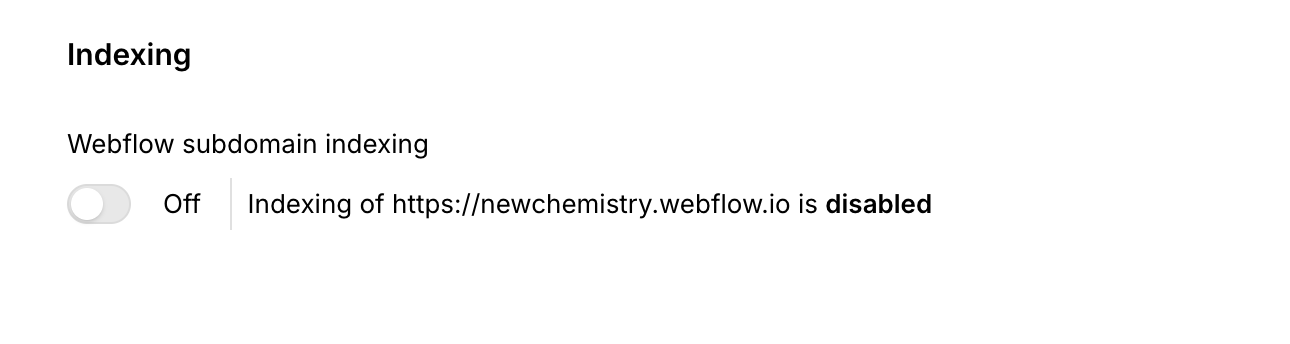
When you publish, Webflow serves your site on its staging subdomain (yoursite.webflow.io) as well as your real domain. If Google indexes both, you are competing against a duplicate copy of your own site, and splitting the ranking signals that should all point to one place.
The fix takes thirty seconds. In your site settings under publishing, disable indexing of the .webflow.io subdomain so search engines only crawl your live domain. Sofian Bettayeb flags this as a foundational Webflow-specific step, and it is exactly the kind of platform quirk a generic SEO consultant misses.
If your site has been live for a while, search site:yoursite.webflow.io in Google to see whether the staging copy is already indexed. If it is, this is your first job.
2. Give every page one primary keyword
Most struggling Webflow sites are not missing content. They are quietly competing against themselves.
When three blog posts all target "webflow seo tips," Google cannot tell which one to rank, so it often ranks none of them well. This is keyword cannibalization, and it is one of the most common problems on content-heavy Webflow sites.
Map one primary keyword to one page, and make sure each page owns a distinct term. Assign distinct primary keywords so multiple pages never chase the same query. Luca Tagliaferro starts every engagement by reverse-engineering what the audience searches and why the current pages are not showing up.
Practically, list your top pages in a spreadsheet, put the intended keyword next to each, and hunt for duplicates. Where two pages overlap, merge them or re-point one at a different term.
3. Optimize for answer engines, not just Google
The searchers you want are increasingly not on Google at all. They are asking ChatGPT, Perplexity, and Google's own AI Overviews for a recommendation, and those tools cite a handful of sources.
When an LLM is looking for sources to cite that relate to a query, they have to reach a consensus. It's completely fine to have content that is deep and thoughtful, but having the ability to summarize your content and get to your point right away is what is valuable for answer engines. You may be tempted to avoid "spoiling" your content, or saving your most important point for the end, but LLMs (and people) scan to see if the content they found is actually what they were looking for. Assure the reader that they found the answer, and they found the right resource. This will make it much more likely that the rest of the content will be understood and consumed.
To get cited, structure content the way answer engines like to quote it. Lead sections with a direct one to two sentence answer, use clear question-style headings, and back claims with specifics an LLM can lift cleanly. This is the discipline we focus on at New Chemistry, and it is the fastest-moving edge in the whole category.
4. Keep the code clean so crawlers and LLMs can read it
Webflow starts you ahead here, which is easy to waste.
Webflow generates clean, semantic HTML by default. It uses proper structural tags, auto-builds your XML sitemap and robots.txt, and gives you direct control over titles, descriptions, canonical tags, and alt text from the visual editor. That is a real advantage over plugin-bloated WordPress builds.
The catch is what you add on top. The ClearBrand 2026 Webflow guide points out that clean HTML matters more than ever for AI search because, as of now, LLMs "can't read javascript." Heavy embeds, interaction-driven content, and text baked into images all become invisible to the systems you most want to reach.
The rule: put anything that must rank or get cited into real, crawlable text. Save the fancy Webflow interactions for decoration, not for your core message.
5. Flatten your architecture and link with intent
Depth is the silent killer of Webflow SEO. Ranking power flows from your homepage outward, and it fades with every extra click.
Keep your important pages within two to three clicks of the homepage. Flow Ninja's technical guide makes the point plainly: crawlers, like people, prefer not digging through many layers to reach an important page. A flat structure keeps authority flowing to the pages that earn revenue.
Then link deliberately. Connect your content-heavy pages to each other with descriptive anchor text, not generic "click here," and point internal links at the pages you actually want to rank and convert. Every time you publish, link back to a few relevant older posts to keep them fresh in Google's eyes.
Done well, internal linking is one of the cheapest ranking levers you have. It costs nothing but attention, and it is fully in your control.
6. Win Core Web Vitals on Webflow specifically
Speed is a ranking factor and a conversion factor, and Webflow gives you the tools to win it. Most sites simply leave them switched off.
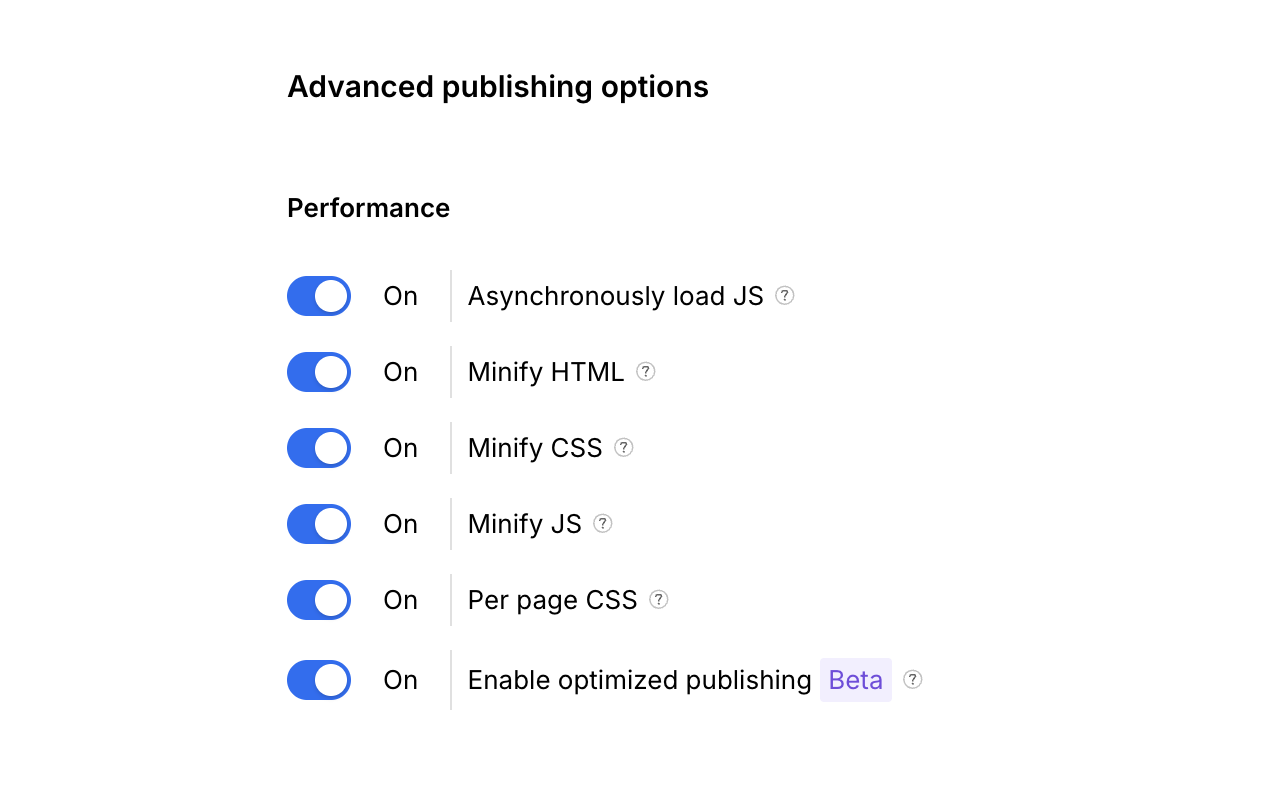
Start in Project Settings under Hosting and Advanced Publishing Options, where Webflow hides its "one toggle" wins: minify HTML, CSS, and JavaScript, and enable SSL. Then compress your images, turn on lazy loading, and lean on Webflow's global CDN so content ships fast worldwide.
Measure with Lighthouse or PageSpeed Insights, and watch the three Core Web Vitals: loading, interactivity, and visual stability. Oversized hero images and stacked third-party scripts are the usual culprits on Webflow sites.
This is the one area where the "run a speed test" crowd is half right. The test is easy. Fixing what it finds, without breaking your design, is the expert part.
7. Add structured data so you get cited
Structured data is how you tell search engines and AI tools exactly what your page is, in a language they trust.
Adding schema markup (for articles, FAQs, products, or your organization) makes your pages eligible for rich results and gives answer engines clean, machine-readable facts to quote. On Webflow, you add it through custom code in page or site settings, or through an app that manages it for you.
Pair it with the basics that still move the needle: title tags under 60 characters with the keyword near the front, meta descriptions under 155 characters that earn the click, and one clear H1 per page. These are small, and they compound.
Structured data will not save weak content. On strong content, it is often the difference between being read and being cited.
The Bottom Line
Ranking a Webflow site is not mysterious, and it is not a matter of one magic setting. It is a sequence of platform-specific fixes, done in the right order, by someone who owns the outcome. Turn off subdomain indexing, give every page one keyword, keep the code clean, flatten your architecture, win your Core Web Vitals, add structured data, and build for answer engines from the start.
The experts quoted here agree on the core point. Tactics are cheap. Judgment about which ones matter for your site, and when, is what you are actually paying for.
If you want that judgment applied to your site, with AI search visibility built in rather than bolted on, that is exactly what we do at New Chemistry. Start with a GEO audit to see where your Webflow site stands in both Google and AI search, or explore our AI Visibility Program if you are ready to build a system.
Frequently Asked Questions
What is a Webflow SEO expert?
A Webflow SEO expert combines SEO strategy with hands-on Webflow experience and takes ownership of your organic growth. Beyond generic SEO, they understand platform-specific factors like subdomain indexing, Webflow's CMS structure, and its code output, and in 2026 they optimize for AI answer engines as well as Google.
Do you need an SEO expert for Webflow?
Not always. Webflow's built-in features let a capable marketer handle the basics, such as meta tags, sitemaps, and clean URLs. You need an expert when the work moves past housekeeping into strategy: keyword mapping across many pages, technical fixes, AI search visibility, and untangling why traffic is flat despite good content.
How much does a Webflow SEO expert cost?
It varies widely by scope and seniority. Freelance consultants often work project-based or on monthly retainers, while agencies price around programs of ongoing work. The more useful question is what you get for the money. A strategy that owns outcomes is worth far more than a cheap monthly checklist that never moves rankings.
Can you do SEO yourself on Webflow?
Yes, up to a point. Webflow makes the fundamentals accessible, and the seven fixes above are all things a motivated marketer can tackle. The limits show up with scale and strategy: large content libraries, keyword cannibalization, technical debt, and AI search optimization are where hiring an expert usually pays for itself.
Ready to be seen?